Search This Blog

Showing posts with label Arduino. Show all posts

Sunday, 17 April 2011

Watterott RedFly-Shield

From Project: Burt

Watterott Electronic very generously sent me a new Arduino Shield they are close to releasing. It's called RedFly-Shield, and uses a RedPine Signals WiFi module (RS9110-N-11-22).

Here's the feature list for this WiFi module -
  • Compliant to 802.11b/g and single stream 802.11n
  • Fully self-contained serial-to-wireless functionality - does not require any host processor bandwidth
  • Includes all the protocol and configuration functions required for WLAN connectivity in Open, WEP and WPA/WPA2-PSK modes of operation
  • Payload data through Serial Interface and SPI
  • Terminates TCP and UDP connections, and offers transparent serial modem functionality
  • Configuration through AT commands and SPI frames
  • Integrated antenna, frequency reference, and low-frequency clock
  • Ultra low power operation with power save modes
  • Ad-hoc and infrastructure modes for maximum deployment flexibility
  • Single supply 3.1 to 3.6 V operation
  • Certification : Module is based on RS9110-N11-02 which is certified by FCC, IC and CE.

Watterott have done a great job in designing this shield. Communication to the RedPine WiFi module is via standard UART using modem-like ASCII 'AT' commands. Supplied with the shield is a nicely fleshed out Wiring library and example code for the Arduino (Tweeter, HTTP client and server).

I'd picked up a Sparkfun FT232RL Breakout board for another project. So the first job was to use it to talk to the RedPine module. As the above picture shows it's quite straight forward to setup and snoop on the serial port.

I'm currently using Windows Vista for development, so I needed to grab HyperTerminal to be able to see the UART data, and to use the Kermit protocol to transfer the latest firmware to the module. NOTE: I first tried using the TeraTerm supplied by GHI for use with their .Net boards, but although this looked like it can successfully transfer the firmware files to the RedPine module, the module failed to load them upon reboot. Thankfully using HyperTerminal worked fine.

Although the Arduino is a wonderful module, I usually get frustrated with the development tools. Hence my current projects are focused on using a GHI FEZ Domino module, and recently their Panda module. I'd become familiar with porting Arduino Wiring code to .Net C# with the Watterott S65-Shield. So with the RedFly-Shield's quite complete Wiring library and examples, I've set about porting this across to managed C# code.

Work-in-progress C# class library and testing solution can be found on Burt's GoogleCode repository (revision r92, 20th April 2011);
http://code.google.com/p/burt/source/browse/trunk/FEZ+Domino+Projects/RedFly/
http://code.google.com/p/burt/source/browse/trunk/FEZ+Domino+Projects/RedFly-Tester/

So far I've managed to get the RedPine module; reset, obtained and decoded the firmware version and MAC address, scanning of broadcast WiFi access points (AP), joining an AP, and obtaining an IP via DHCP.

Hopefully in the next week or so I can complete the port of the Wiring library and examples. Plus code up a Socket class.

*Must resist Portal 2*
 
Matt Isenhower's Blog - MicroTweet - Twitter OAuth API Library for the .NET Micro Framework


MicroLinq for the .NET Micro Framework -MicroLinq for the .NET Micro Framework

C# .NET DNS query component
NETMF FTP SERVER
NETBIOS NAME SERVER FOR WIZ5100
NTP TIME ADJUSTEMENT FOR WIZ5100

Sunday, 27 February 2011

Getting to grips with the OpenBench Logic Sniffer

I haven't used a Logic Analyzer since the mid-90s. With new products on the horizon, it's starting to become something needed with this hobby work. Budget constraints have always made it difficult to justify picking up a second hand analyzer. So I was intrigued to come across the OpenBench Login Sniffer (OLS). I ordered one from Proto-Pic, here in the UK. They delivered version 1.01 of the OLS board.

The first step was to make sure that the OLS was up-to-date with FPGA and PIC firmware. At the time of writing v2.12b of the OLS software is available here. Included is a simple application that can flash the OLS EEPROM with new FPGA bit-stream, and update the PIC firmware.

The Gadget Factory has a YouTube channel with a few videos showing FPGA logic analysis and UART debugging. Setting up some UART transmission looked like the easiest way to try out the OLS, and quick to setup on the Arduino Deumilanove.

The OLS is limited with the number of samples it can record, so we need to tell the OLS when we are about to transmit over a UART line. The Arduino runs with a 16 MHz crystal, so the OLS should be able to pick up a pulse on one of the digital I/O pins.

Below is the Wiring code to setup the UART on pins 2, and 3. Plus the trigger pulse output on pin 4. The NewSoftSerial library is used to allow for higher baud rates to be tested.
#include <newsoftserial.h>
NewSoftSerial UART1(2,3); // rx,tx
void setup()
    pinMode(4, OUTPUT);
    digitalWrite(4, LOW);
    UART1.begin(115200);
}
void loop()
    digitalWrite(4, HIGH);
    digitalWrite(4, LOW);
    UART1.print("hello");
}
This simple PDE file can be found here. Also at that SVN location is the project file used with the OLS alternative SUMP client (Jawi's version supplied with the v2.12b OLS software).

I connected the OLS breakout probes to Gnd on the Arduino, and the digital I/O pins 2, 3, and 4. With the above Wiring sketch uploaded to the Arduino I was then able to start getting to grips with Jawi's Java SUMP Client. I ended up sampling at 50 MHz, and that was able to capture just over 450 micro seconds worth of data. The SUMP Client has plugins for analyzing common bus protocols. Below is the UART analysis. As you can see, the OLS managed to capture the UART Tx from the Arduino, result!!

UART Analysis results


Generated: 27 February 2011
Statistics
Decoded bytes5
Detected bus errors0
Baudrate230400 (exact: 122249)
RxDTxD
IndexTimeHexBinDecASCIIHexBinDecASCII
023.280 μs0x680b01101000104h
1112.040 μs0x650b01100101101e
2200.780 μs0x6c0b01101100108l
3289.520 μs0x6c0b01101100108l
4378.280 μs0x6f0b01101111111o

Next up SPI testing...

Saturday, 5 February 2011

FEZ Domino

A few months ago now I was drawn to the relatively new Arduino semi-compatible boards capable of running .Net MicroFramework managed code. With a rich feature list I opted for the FEZ Domino and grabbed one from a local supplier. Curious to see how an ARM core would handle the CLR and managed code.

The design of the Domino is very nice. There are key differences between it and an Arduino, particularly on the IO lines. So you need to be wary when using Arduino shields with the Domino.

As for key features, here is a list from the FEZ Tutorial PDF;
  1. Lowest cost at available features!
  2. Runs Microsoft's .NET Micro Framework 4.0.
  3. Uses Free Visual C# 2008 express.
  4. Run time debugging over USB or serial.
  5. Program in modern managed language.
  6. 32-bit ARM processor, running at 72Mhz.
  7. FAT file system for storage on SD cards and USB memory devices.
  8. Easy upgrades to high end systems like ChipworkX or Embedded Master.
  9. The FEZ core, USBizi, is widely used in commercial applications around the world.
  10. RunTime Loadable Procedures
After using Microsoft Visual Studio products for over a decade. One beautiful feature is the use of the free Express Edition as an IDE, and single-step debugger! As well as a feature rich class library in the Microsoft .Net MF framework.

My first task was to develop the interface between the SparkFun ROB-09571 Motor Controller and the FEZ Domino. This turned out to be incredibly easy thanks to the breakout of a second UART to the Domino's EXT edge connector. Three female to female connecting wires hooked up TX, RX, and Gnd. The Domino's System.IO.Ports.SerialPort class can then be used to setup and communicate with the Motor Controller. I also hooked up digital pin 10 (FEZ_Pin.Digital.Di10) to the reset line on the Motor Controller. The MotorTest Visual C# solution can be found here (revision r62).

Saturday, 16 October 2010

Re-programming the ROB-09571 (Serial Controlled Motor Driver)

Sparkfun's Serial Controlled Motor Driver is a lovely board. It has been working great in Project: Burt. One thing I've been meaning to do though is to change the firmware it is supplied with. Various comments suggests that this is possible with an Arduino, so I spent the morning having a look into this.

The first thing is to get the firmware re-compiled. For that we need to download and unzip the firmware supplied by Sparkfun. Inside the zip file are three files; main.c, main.h, and a Makefile. The Makefile points to using WinAVR to rebuild this code. A quick trip via the WinAVR website, takes us to the download location on SourceForge. I used the latest installer file called WinAVR-20100110-install.exe Choosing the default install options, and making sure that the PATH environment variable was updated.

Opening up a cmd prompt and navigating to the unzipped firmware, it was then a simple case of using 'make clean' to verify that WinAVR was installed ok. Then 'make all' to rebuild the firmware. From the resulting files we only need the main.hex and main.eep files. These contain the hex dump ready for uploading to flash memory, and the EPROM (eep) file ready to burn into the ROB-09571.

So far so good. The next step was working out how to turn an Arduino into an AVR ISP programmer.

Looking at the Deumilanove and the ROB-09571, they both have ICSP headers breaking out the SPI lines.


On the Duemilanove the 6-pin header is clearly labelled. On the ROB-09571 you need to solder on a header (in my case, design of Project: Burt restricted me to a two row right angle header). On both boards pin 1 is conveniently labelled (top left of each header). A quick look at the Deumilanove schematic and ROB-09571 schematic shows that all the neccesary ICSP lines are connected to the 328p ICs. So it should be a simple case of connected pin 1 to pin 1, pin 2 to pin 2, etc. That sounds far too easy, and it is :)

Next is what code do we need to upload to the Arduino. I'm currently using version 018 of the Arduino SDK Included is a sketch called ArduinoISP. Looking at this code, it recommends adding three LEDs (and current limiting resistors) to three of the Arduino digital pins. A tutorial describing how to connect the LEDs to an Arduino can be found over at LadyAda. Below is my initial wiring setup.

BEWARE: This wiring setup will never work! Read on for why it doesn't work.


All three LEDs use 470 ohm resistors to limit current, connected with a common ground (blue wire). The green LED is connected to D9 (green wire), the red LED connects to D8 (red wire), and the yellow LED connects to D7 (white wire). These LEDs are used by the ArduinoISP sketch to inform you of progress and/or errors. The six green wires connect the two ICSP headers.

Uploading the ArduinoISP sketch to the Duemilanove we are now ready to try reflashing the ROB-09571. But WAIT!! One vital wire is in the wrong place!!

Looking at the Duemilanove schematic it clearly shows that pin 5 of the ICSP header is connected to the 328p RESET pin! This is fine to reset all boards connected via ICSP, but the ArduinoISP sketch requires a seperate slave reset. A quick fix is to disconnect the green wire to pin 5 of the ICSP header, and connect D10 from the Arduino to pin 5 ICSP header on the ROB-09571. This now agrees with the expected wiring connections in the ArduinoISP sketch. An alternative is not to use the ICSP header, and connect to D10, D11, D12, and D13 on the Arduino.

At last. A correct wiring setup! Now it's time to flash that hex file.


We now need to use a program supplied with WinAVR called AVRDude. This communicates with the ArduinoISP sketch, and uploads the hex file to the ROB-09571.

The first thing we need to do is test that the Arduino, plus ArduinoISP sketch, and the wiring is working ok. Use the following cmd prompt line (changing com21 to the port you have your Arduino connected);
avrdude -p m328p -P com21 -b 19200 -c avrisp -v
You should eventually see;
avrdude: AVR device initialized and ready to accept instructions
If you receive any form of errors (protocol, sync, etc.), check your wiring.

We are now ready to upload our new ROB-09571 firmware. We can simply use the following commands;
avrdude -p m328p -P com21 -b 19200 -c avrisp -v -U flash:w:main.hex
avrdude -p m328p -P com21 -b 19200 -c avrisp -v -U eeprom:w:main.eep
AVRDude prints out some nice progress text. And the yellow LED should flash rapidly when the programming occurs.

When AVRDude has finished succesfully, you then have completed uploading new firmware to the ROB-09571 :)

Sunday, 13 June 2010

Project: Burt - Assembly #1 Chassis

Here's a short video showing the initial chassis assembly.


As mentioned in a previous blog entry, I have assembled the RobotShop Robot Rover for Arduino tank kit. I followed the excellent assembly video here.

On the front there is a Sharp IR sensor (GP2Y0A21YK). It's three wires (Vo, Gnd, Vcc) are fed underneath the chassis and emerge through a hole. These three wires have also had male jumper leads spliced onto them, to make it easier to test via a breadboard. The 9V battery wires, and four motor wires are also routed through the chassis.

From my first robot I have some standoffs that fit nicely to the servo mounting points on the chassis (Pololu standoffs). I also have the CMUCam3 assembled and ready for use, once the main robot is up and running. Note: that this won't be the final camera module. The CMUCam3 is just ready for me to use now. I need to get two cameras huddled on the front of Burt for stereo vision libraries.

Underneath the chassis the four 1.5V batteries and 9V battery are ideally placed to connect to the motor controller and micro controller.

On the left of the video is a hint as to the next update. The testing of the ProtoShield, IR sensor, PowerSwitch, and Accelerometer.

Sunday, 6 June 2010

Project: Burt

Introduction

After a couple of years of life changes, the itch to revisit robotics has taken hold. The first robot was something that I rushed into and made some crutial, and costly, design mistakes. This time around I have had time to revisit new products and come up with a new robot design, 'Project: Burt'.

It's been great re-visiting web sites and forums I have been to before, such as Sparkfun and Pololu. It was also encouraging to find two UK suppliers that I hadn't seen before, namely Cool Components and SK Pang.

Being away from the home-brew robotics community, for almost a year and a half, has meant that I had some catching up to do with the evolution of robotics parts. Immediately three parts jumped out at me; Robot Rover for Arduino (Tank Kit), Serial Controlled Motor Driver (ROB-09571, ATMega328), and the Arduino Duemilanove (ATMega328).

The ATMega328 used in the Duemilanove and Serial Controlled Motor Driver (SCMD), looks like a perfect micro-controller to use as a sensor analyser and communications hub. Plenty of digital IO and analog inputs to play with. It was a bit overwelming, and warming, to see the rise of the Arduino products. A heathy development community has sprung up. As I thought about various sensors, controllers, communication sub-systems, most of my questions as to what to use, and how to use/connect them, were answered via Arduino's wonderfull web portal and forums.

Design List

Within a few weeks my thoughts for 'Project: Burt' were starting to come together. As a starting list I had the following in mind;

Arduino Duemilanove
- As the main controller.

Robot Rover for Arduino
- As the main chassis.

Serial Controlled Motor Driver
- As the motor controller (incl. overcurrent detection).

Pololu Pushbutton Power Switch LV
- As a potential power switch for the motor controller.

Dimension Engineering Accelerometer (DE-ACCM2G)
- A buffered ±2g accelerometer based on the Analog Devices ADXL332.

IR Range Sensor (Sharp GP2Y0A21YK)
- Included with the Robot Rover kit.

Ordering

Two orders later, I have a desk full of parts :)


Included in the orders we're a handfull of other goodies; An Arduino Starter kit (C), an Arduino ProtoShield Kit, and a couple of MCP23008 and MCP23016 IO extenders (with I2C interface) for future expansion (e.g. LED segments, Servos, USB host connection, VirtualCogs interfacing, etc.).

Physical Layout


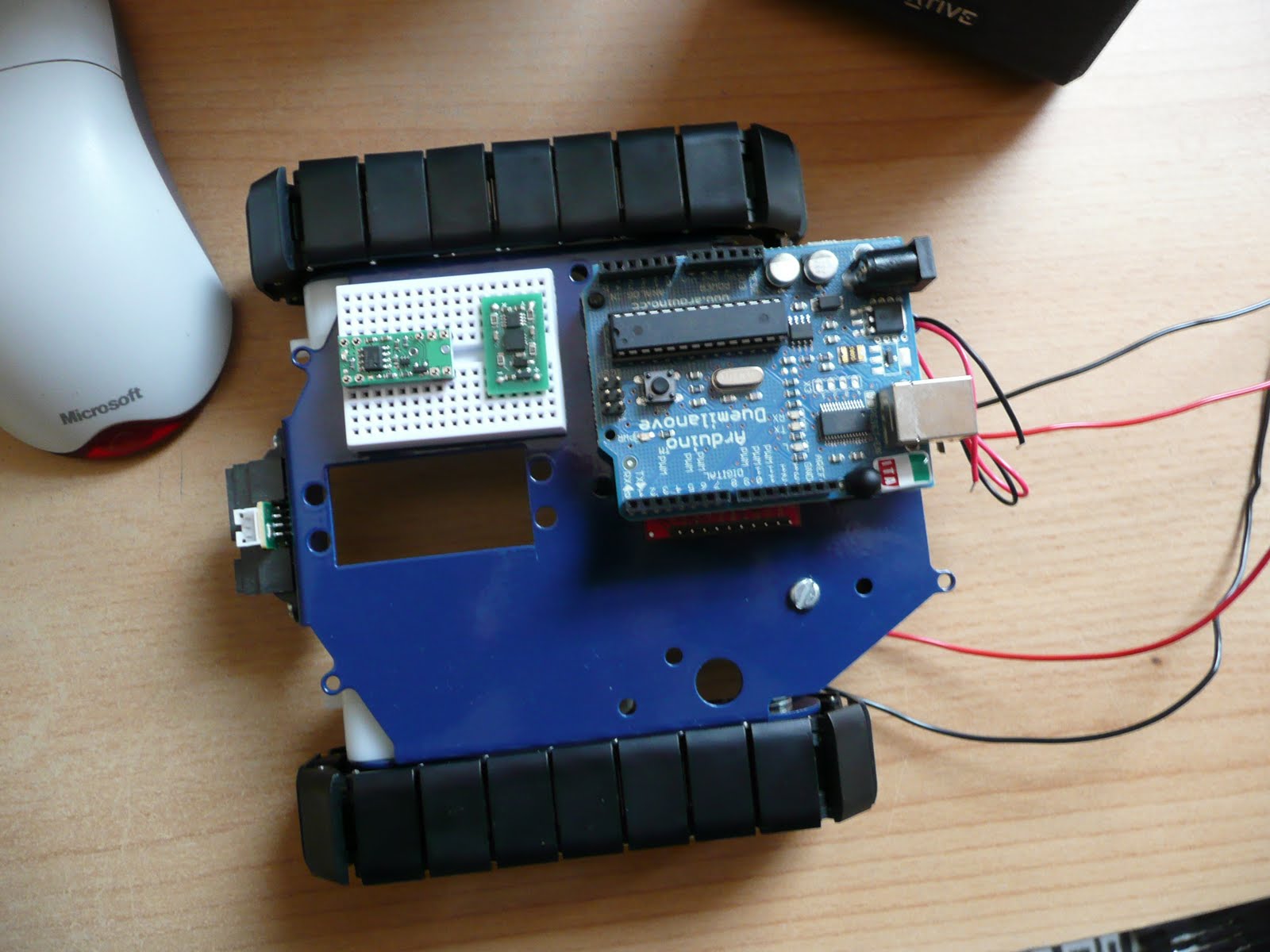
The Arduino is placed on two stand-offs, so there is about a 1cm space below it to mount the motor controller. If any heat issues arise there are other mounting holes on the chassis to use. But for the moment this looks like a good starting point.

The main boards that need individual testing;


And so, it begins

Over the next few weeks (months) I'll be continuing along like my first robot blogging. Fleshing out the Google code project with links, Arduino PDE code, Eagle schematics, more photos and videos. A detailed step-by-step guide to getting Burt up and running.

Unlike the muddled mess that was my first robot, Burt is so far shaping up to be a nice project to get back into robotics. Plus a new starting point for vision experiments. Maybe I'll be able to get the old Virtual COGs boards dusted off and make use of the lovely Freescale i.MX21 266MHz ARM9 processor, and maybe save up for something like the Surveyor Stereo Vision System...